
NDT Tracking for Pipe Fabrication: What Most Teams Get Wrong
Ask a QC manager in the middle of a live pipe fabrication project how many welds are pending radiographic testing.
Most of the time, the honest answer is: "I'd have to check."
That answer should be immediate. NDT tracking in pipe fabrication is one of the most operationally critical pieces of information on any project that requires non-destructive examination — it determines progression, hold points, and inspection scheduling. Not knowing it in real time is like running production without knowing which machines are down.
This post covers why NDT tracking consistently fails in the tools most teams are using, what it actually takes to track NDT reliably on an active project, and what a better workflow looks like.
What NDT Tracking Actually Requires
Non-destructive testing in pipe fabrication is not uniform. Different welds, on different lines, under different codes, require different examination methods and different coverage percentages.
A properly maintained NDT record needs to answer:
Per weld:
- Is NDT required for this weld? (Some are exempt — small bore, non-critical systems)
- What method is required? (RT, UT, MT, PT, or some combination)
- Has the examination been completed?
- What was the result? (Accept, reject, or repair)
- If rejected: has the repair been re-examined?
Per line or system:
- What is the required NDT percentage for this service class?
- How many welds have been completed to date?
- How many are pending examination?
- How many are in repair loops that affect the count?
- What is the current coverage percentage, and does it meet the code requirement?
A flat spreadsheet column — "NDT Type: RT" and "NDT Result: Accept/Reject" — answers the per-weld question on individual rows. It cannot answer the per-line questions without someone doing manual math across the entire dataset.
And that math needs to be re-done every time a weld is completed, fails, goes into repair, or gets removed from the NDT scope.
Why the Spreadsheet Approach Breaks Down
The Excel weld register wasn't designed for dynamic NDT tracking. It was designed to hold data — and it does that reasonably well. The problem is the work required to extract meaning from that data.
The coverage percentage problem
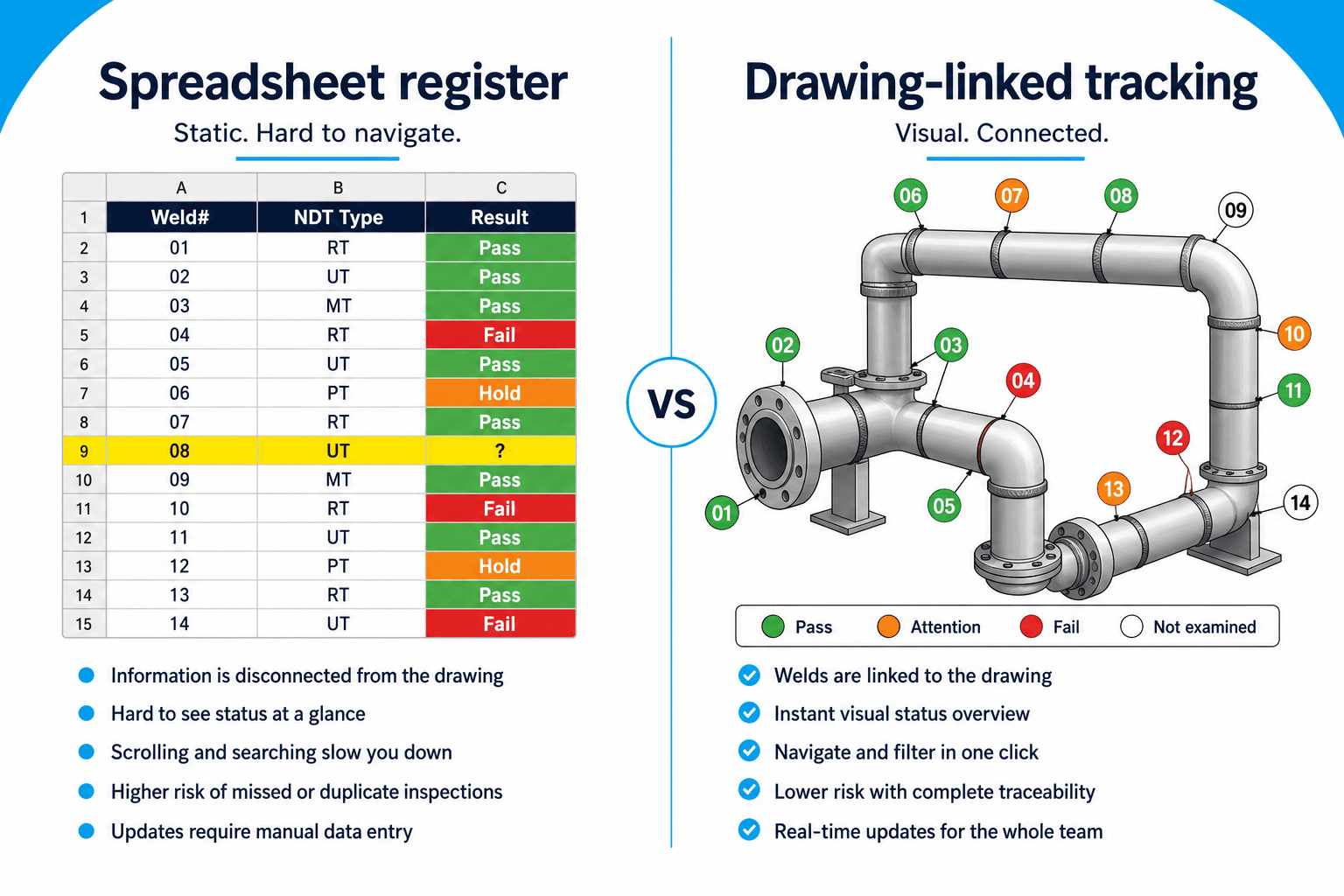
Code-required NDT coverage (under ASME B31.3, for example) works like this: a certain percentage of welds in a given fluid service classification require examination. That percentage is calculated against the total number of welds in that service class — and it fluctuates throughout the project as welds are added, repairs are documented, and inspection results come in.
In an Excel register, calculating current coverage requires filtering by service class, counting welds requiring RT, counting those completed, and subtracting any in-process repairs. On a project with 300+ welds, this is a 10–15 minute exercise every time someone needs the number.
On an active project, "every time someone needs the number" can mean multiple times per day.
The repair loop problem
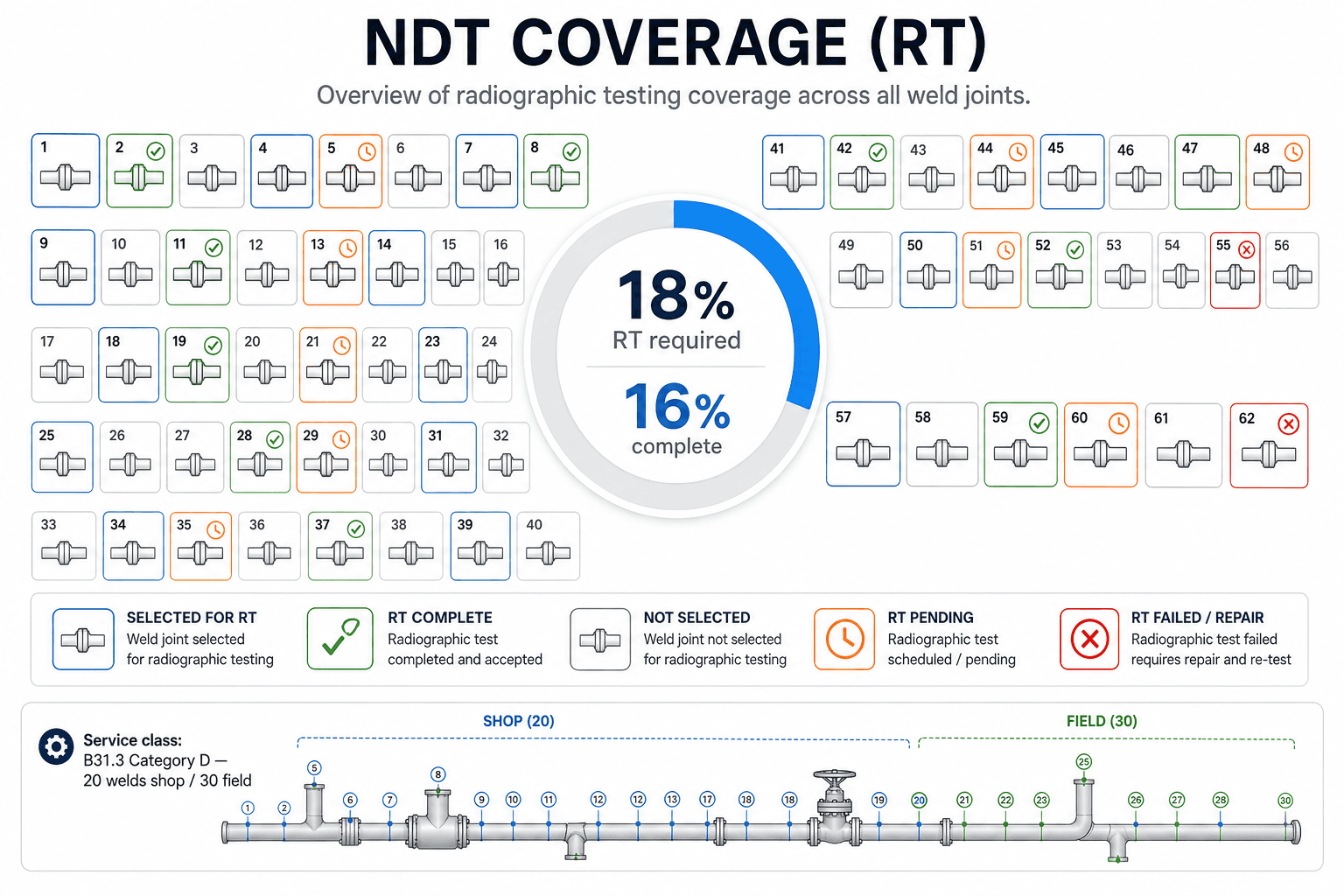
When a weld fails NDT and is cut out for repair, it re-enters the inspection cycle. The repair weld itself often requires 100% examination under code. The original failure affects the per-line coverage count.
In a flat spreadsheet, this creates a data integrity problem: do you update the original row? Add a new row for the repair? Create a separate repair log? Most teams improvise a solution that makes sense to the person who built it and nobody else.
When the QC manager leaves mid-project, the new person inherits a repair tracking system they didn't design and may not fully understand.
The hold point visibility problem
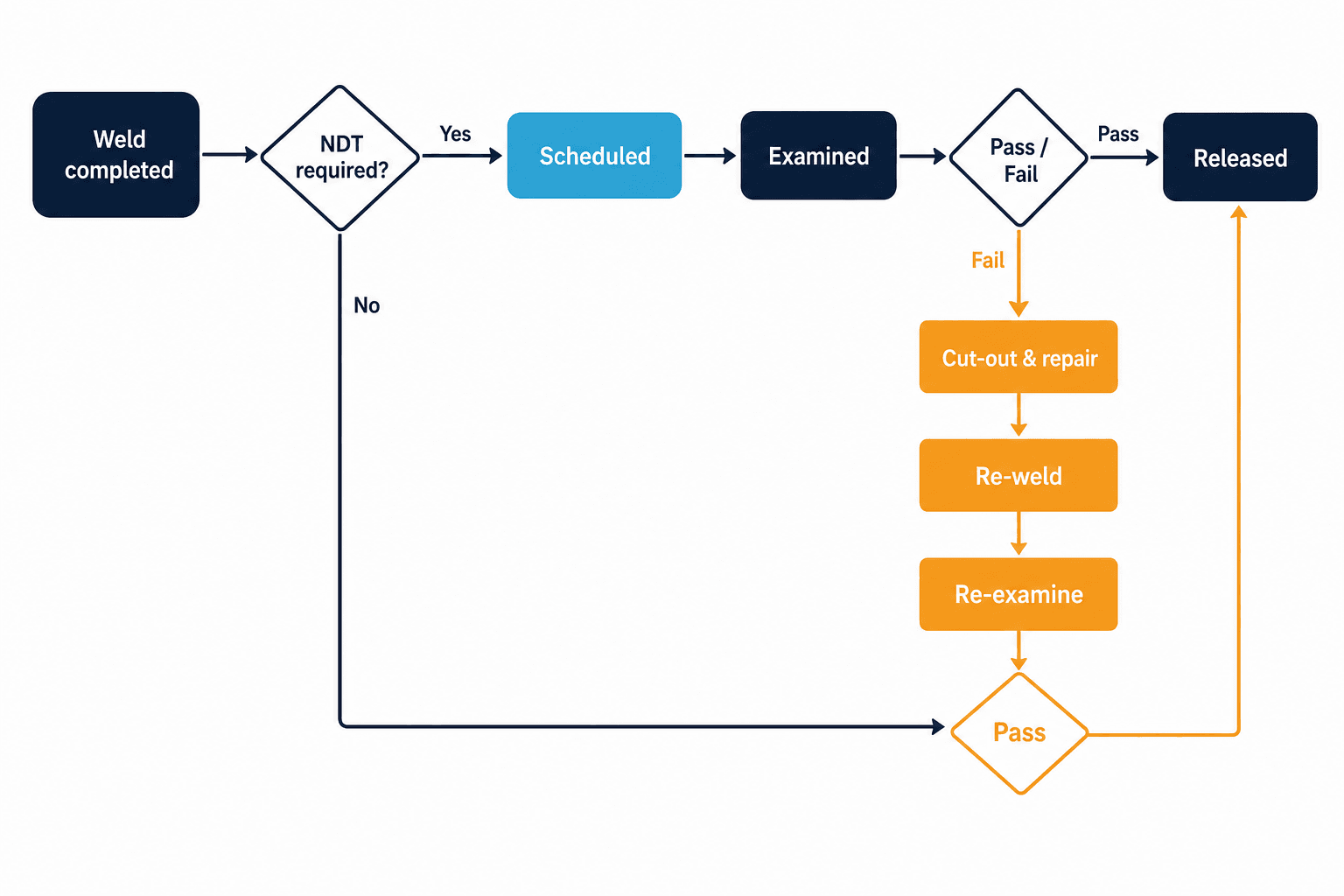
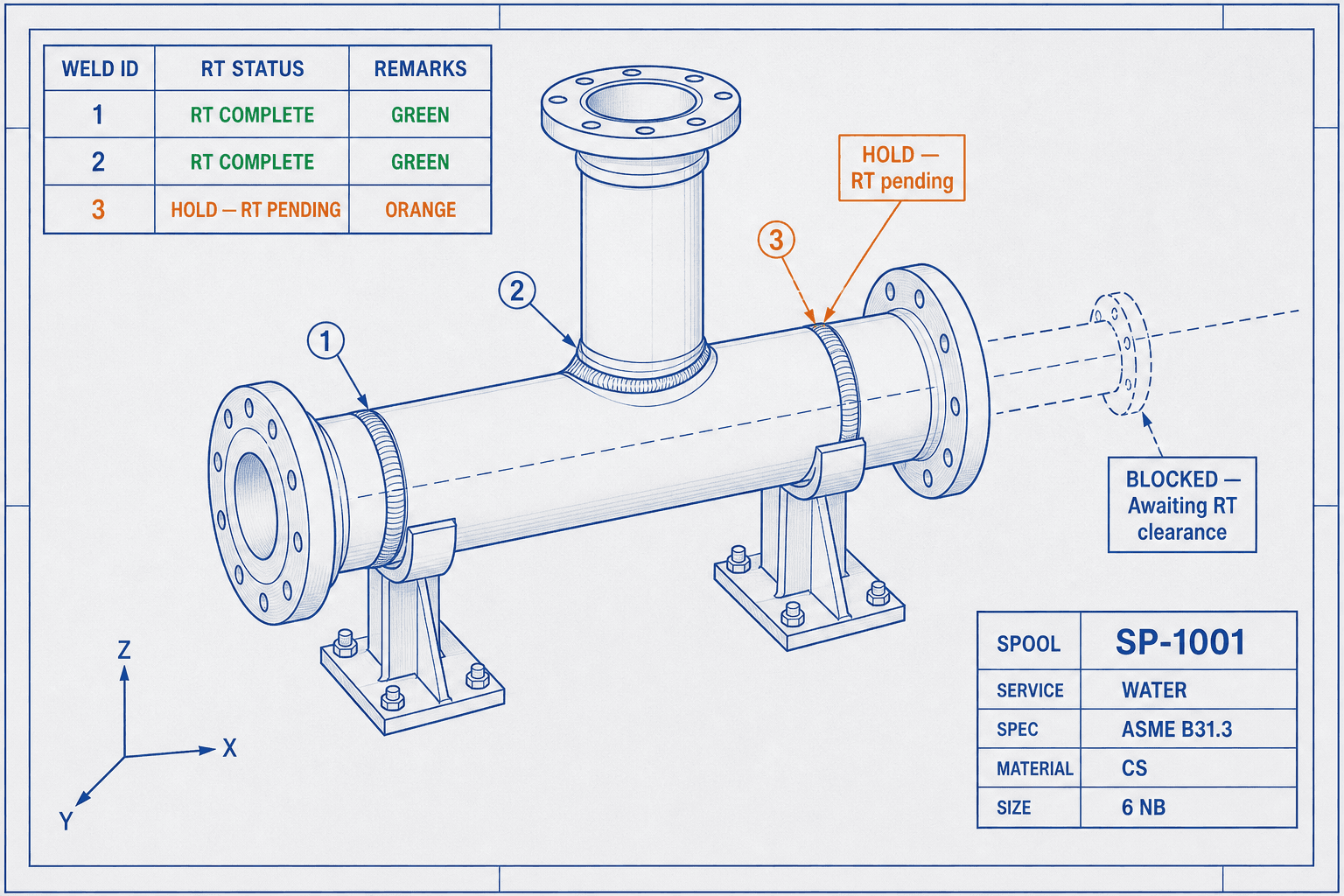
NDT hold points — welds that cannot progress to the next stage until examination is complete — are supposed to gate fabrication sequencing. In practice, on a busy shop floor, a hold point in column M of an Excel spreadsheet is easy to miss.
Welds get painted. Flanges get fit up. The spool moves to hydro. And then someone notices the hold point that was never cleared.
What Proper NDT Tracking Looks Like
Effective NDT tracking has three properties that most spreadsheet-based systems lack:
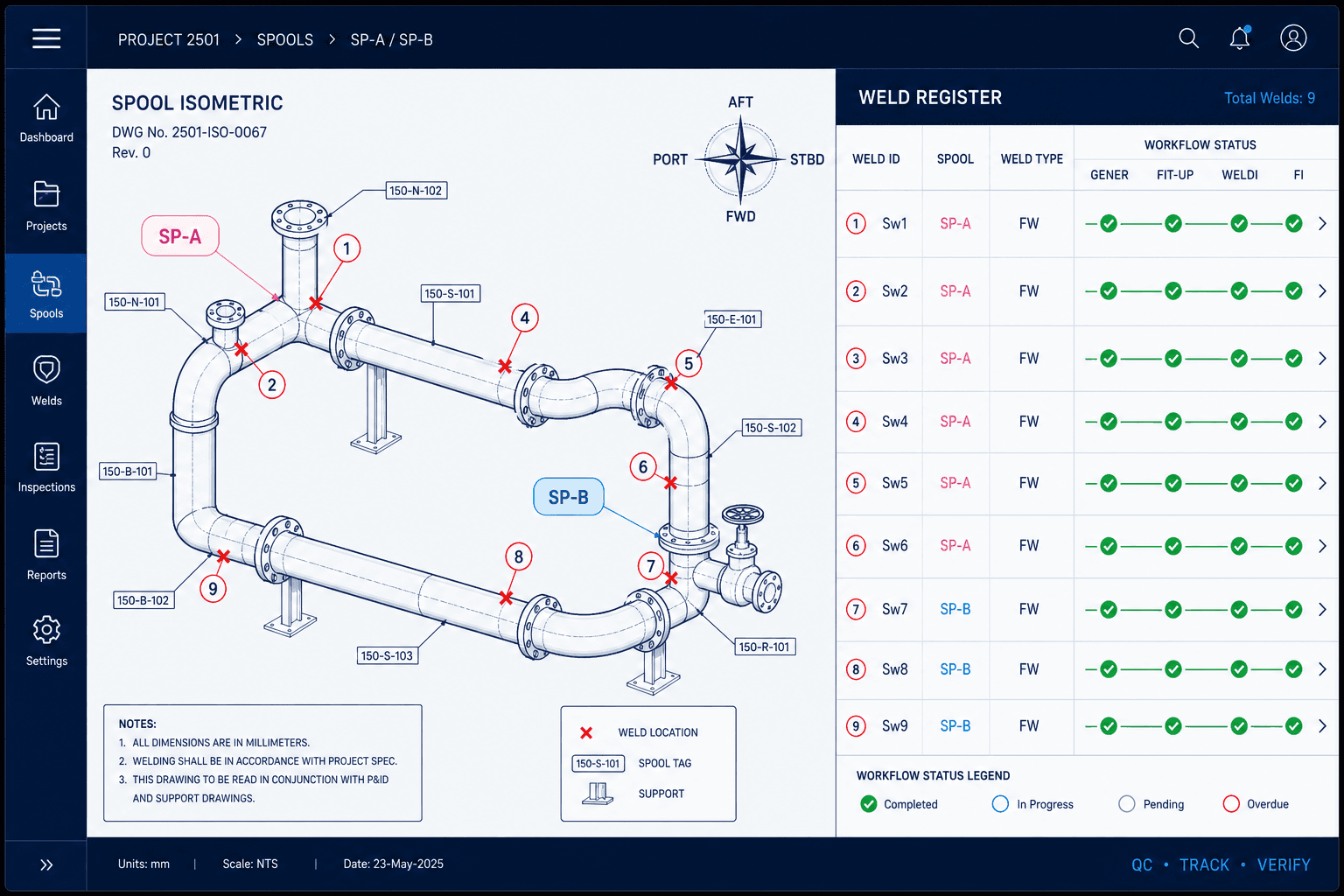
It's tied to the drawing. Each weld's NDT requirement should be visible in the context of the drawing — not as a row in a table, but as a status on the isometric. When you're looking at the spool, you can see which joints are clear and which are pending. You don't have to cross-reference. See the load a PDF tutorial for how MapWeld sets that up.
It calculates automatically. Coverage percentages should update without manual math. When a weld is logged as complete — pass, fail, or repair — the coverage number for that line should change immediately. The QC manager should be able to pull up current NDT status at any moment without running a query.
Repair lineage is preserved. Every repair should be linked to the original weld, not filed separately. The history — original weld, first examination, failure, cut-out, re-weld, re-examination, final result — should be accessible as a single record, not scattered across rows.
How MapWeld Handles NDT Tracking
MapWeld stores NDT requirements at the system level and resolves them per weld through its line assignment. Each system defines which methods apply (RT, UT, MT, PT) and the shop/field coverage percentages. When you place a weld marker on the drawing, it inherits those requirements automatically — no parallel spreadsheet to maintain.
As inspection results come in, you update status on the weld marker and in the NDT board (requests, reports, and repair states). The drawing reflects progress visually through weld status segments.
Coverage visibility: Because every weld knows its resolved NDT requirements, MapWeld calculates selection and coverage for each method and location. You don't rebuild a summary every time the client asks — the current state is derived from the captured data.
Hold point visibility: Welds with open NDT hold points are visually distinct on the drawing. It's hard to overlook a weld marker that's still in hold status when it's sitting on the isometric in front of you.
Repair tracking: When a weld fails and goes into repair, the repair record stays attached to the original weld marker. The full lineage — including repair weld number, new welder, WPS for the repair, and retest result — is accessible from the same marker that holds the original weld data.
When a client asks for a list of all welds that went through repair, with their examination history, the export generates that list directly. No reconstruction.
Getting Your NDT Tracking Under Control
The teams that track NDT reliably on live projects aren't using more complicated systems. They're using systems that put the data where people actually work — on the drawing — and make the calculations automatic.
If your current approach requires someone to manually run the numbers every time a client asks for NDT status, that's not a process you want to sustain for the length of a project.
Try it on one drawing — free, no account needed →
You can set up NDT requirements for a full spool in under 15 minutes and see exactly what live coverage tracking looks like.
Have a specific NDT tracking challenge on an active project? Email hello@mapweld.app — we're happy to talk through how MapWeld handles it.