
Pipe Spool Tracking: From Paper Markup to Structured Data
Every pipe fabrication shop runs on two parallel systems.
The first is weld tracking — the QA and compliance layer. Welder ID, WPS, visual inspection, NDT results, repair records. It's mandatory under code. It lives in the weld register, the inspection log, the turnover package. Auditors ask for it. Clients expect it. Shops invest in it because they have to.
The second is spool tracking — the production and physical traceability layer. Where is spool P-204 right now? Is it in fit-up, at the welding bay, waiting for NDT clearance, in the paint area, or staged for dispatch? Who moved it last? Is it blocking the next operation on the line?
This second system is not optional on a live project — but it's almost never treated as one.
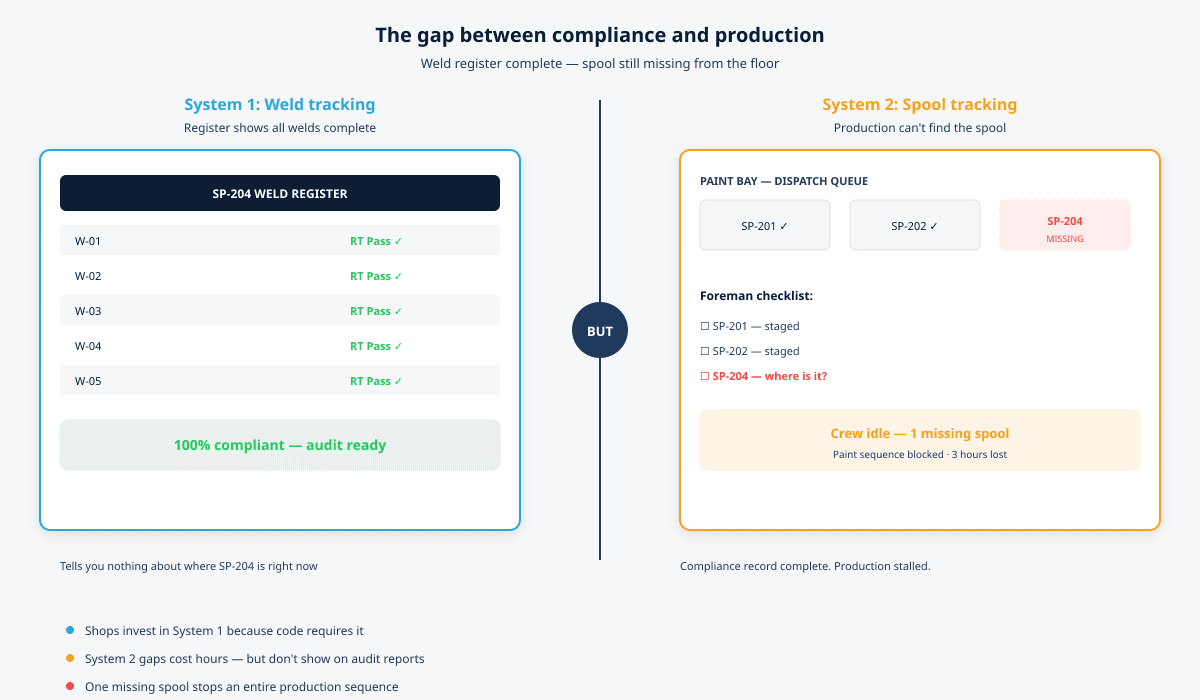
Most shops have a weld register. Far fewer have a reliable way to answer: where is that spool, and what stage is it at? When that information isn't easy to retrieve, production gaps appear. A crew stands idle because one spool is missing from the staging area. A paint sequence gets held up because nobody can confirm which spools cleared NDT. A dispatch list goes out with a spool that was never released.
One missing spool. Hours of downtime. And the weld register — complete, compliant, up to date — tells you nothing about it.
This post is about why pipe spool tracking is a separate production system from weld tracking, what happens when shops conflate the two, and what structured spool tracking actually looks like on the shop floor.
Two Systems, Two Purposes
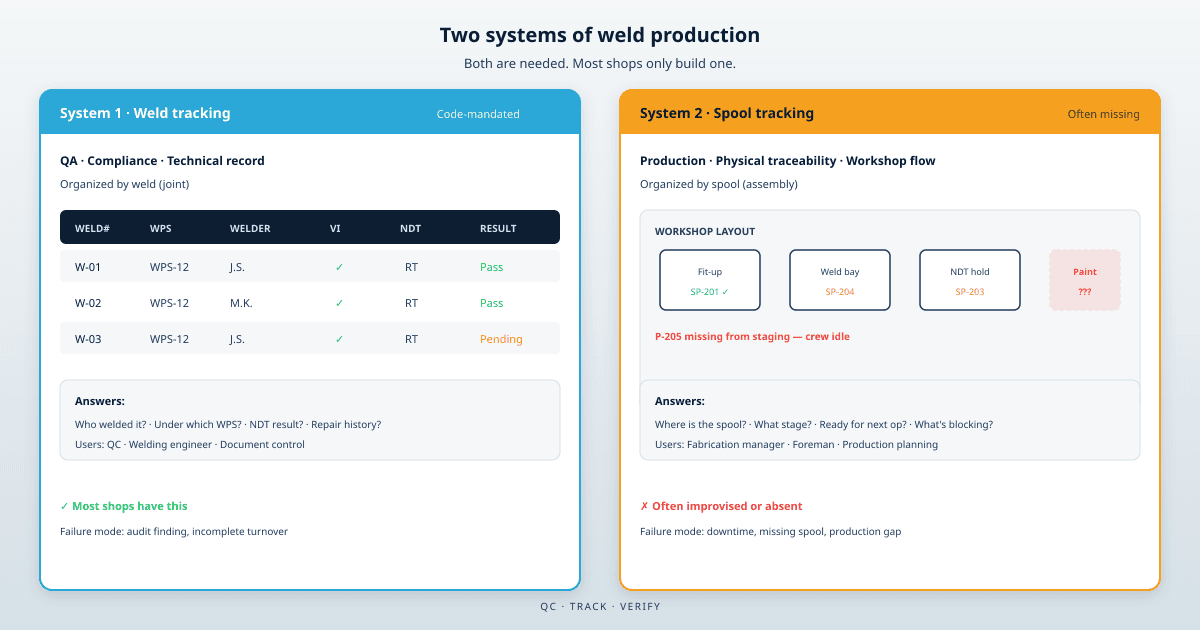
Weld production is not a single workflow. It's two structures running in parallel — each answering different questions, serving different people, and breaking in different ways.
System 1: Weld tracking — QA, compliance, and the technical record
Weld tracking is the code-mandated record of what happened at each joint. It answers:
- Who welded this joint, under which WPS?
- Has it passed visual inspection?
- What NDT was required, performed, and accepted?
- If it failed, what is the full repair and retest history?
This is the domain of the QC team, the welding engineer, and document control. It lives in the weld register, the inspection reports, and the turnover documentation. It's organized by weld — one row per joint, one record per examination.
Under ASME B31.3 and equivalent codes, this record is not optional. It's what proves traceability at audit and what gets handed over at project close. Most shops have a process for it, even when that process is an Excel file maintained under pressure.
System 2: Spool tracking — physical traceability, workshop movement, and production flow
Spool tracking is the operational record of where each fabricated assembly is in the shop and what is blocking it from moving forward. It answers:
- Where is spool P-204 physically right now?
- What production stage is it at — fit-up, welding, inspection hold, NDT wait, paint, staging?
- Which spools are ready for the next operation, and which are blocked?
- What is the spool completion status across the project — not weld by weld, but assembly by assembly?
This is the domain of the fabrication manager, the shop foreman, and production planning. It's organized by spool — the unit that actually moves through the workshop, gets painted, gets staged, and gets dispatched.
Code doesn't explicitly require a spool tracking system. But production does. And when this layer is missing or buried inside a weld register, the shop pays for it in search time, miscommunication, and idle crews.
| Weld tracking | Spool tracking | |
|---|---|---|
| Purpose | QA, compliance, technical record | Production, organization, physical traceability |
| Organized by | Weld (joint) | Spool (assembly) |
| Primary users | QC, welding engineer, document control | Fabrication manager, foreman, production planning |
| Mandatory? | Yes — code and contract | No in code — yes in practice |
| Typical tool | Weld register, inspection log | Often nothing structured |
| Failure mode | Audit finding, incomplete turnover | Downtime, missing spool, production gap |
Why Shops Get System 1 Right and Miss System 2
The asymmetry is understandable.
Weld tracking has external pressure. Codes require it. Clients audit it. Third-party inspectors check it. The consequence of a gap is visible — a finding, a hold on release, a failed documentation review.
Spool tracking has internal pressure only. The consequence of a gap is a foreman walking the shop floor looking for a spool that should be in bay 3 but isn't. A paint crew waiting. A dispatch that gets pushed because one spool can't be located. These costs are real but they don't show up on an audit report — they show up as lost hours.
The practical result: shops build weld registers. They print isometrics and mark them up. They maintain inspection records. But spool status — where each assembly is, what stage it's at, what's blocking it — lives in someone's head, on a whiteboard, or scattered across handwritten notes on drawings.
When someone needs that information, it's not easy to retrieve. You call the foreman. You walk the floor. You check three different places and hope the spool wasn't moved since yesterday.
What Happens When Spool Tracking Is Missing
The failure modes are predictable — and expensive.
One missing spool stops a sequence
Production is sequenced by spool, not by weld. A crew assigned to paint or install a run of spools needs all of them staged and cleared. If one spool is unaccounted for — still at the welding bay, held for NDT, or simply misplaced in the yard — the sequence stops. The weld register can show every joint on that spool as complete. It cannot tell you the spool is not where it needs to be.
Spool status has to be derived — and nobody derives it continuously
A weld register is organized by weld. Spool status is a rollup: the spool isn't ready until every weld on it has cleared inspection and NDT. Deriving that from a flat register means filtering, counting, and checking every row for that spool. On a project with 80 spools and 400 welds, that rollup happens when someone asks — not continuously.
By the time the fabrication manager gets a number, the floor has already moved on.
The drawing markup disappears; the production record goes with it
Prints get revised, rolled up, filed, or lost. The handwritten note that said "P-204 → paint bay" was on last week's revision. The weld data may have been transcribed into the register. The spool's physical location and production stage often wasn't.
This is the same structural problem that breaks NDT tracking on active projects — the capture surface and the official record are different systems, and they drift apart under pressure. For spool tracking, the drift is worse because there often is no official record at all.
NDT hold points block spools invisibly
A single weld pending RT can block an entire spool from release — but in a flat register, that hold point lives in a column on one row. On a busy shop floor, the spool moves to paint anyway. Flanges get fit up. Hydro gets scheduled. Then someone notices the hold point that was never cleared.
The weld tracking system caught the hold. The spool tracking system — if it existed — would have prevented the spool from progressing.
What the Two Systems Need to Do Together
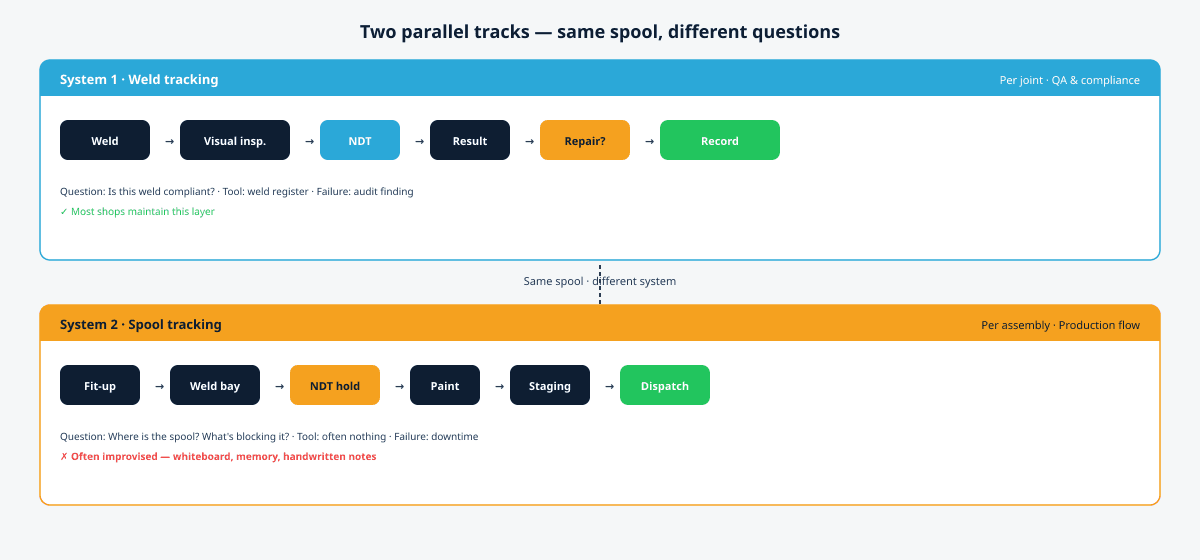
Weld tracking and spool tracking are not competing approaches. They're complementary layers — and a production-ready shop needs both working from the same source data.
Weld tracking captures compliance at the joint. Each weld records welder, WPS, inspection, NDT, and repair history. This is the technical record the code requires.
Spool tracking aggregates production status at the assembly. Given the weld-level data, the system should know: this spool is 4 of 5 welds complete, NDT is pending on weld 4, release is blocked. No manual rollup. No foreman running numbers before the morning meeting.
Physical traceability stays visible. When you're looking for spool P-204, you should be able to see its production stage on the drawing — not call three people and walk the yard.
Reliable pipe spool tracking software does three things the paper-plus-spreadsheet approach can't:
Capture weld data at the source, on the drawing. The isometric is where the work happens. When a weld is marked complete, that is the data entry — not a note on paper that gets typed in later.
Aggregate spool status automatically. If three of five welds on spool P-204 have passed visual and NDT, and two are pending, the spool is not complete — and the system reflects that without someone running the numbers.
Keep the drawing as the working document. When you need to know where a spool stands — technically and in production — the isometric with status markers is faster than cross-referencing a spreadsheet and walking the floor.
How MapWeld Handles Both Layers
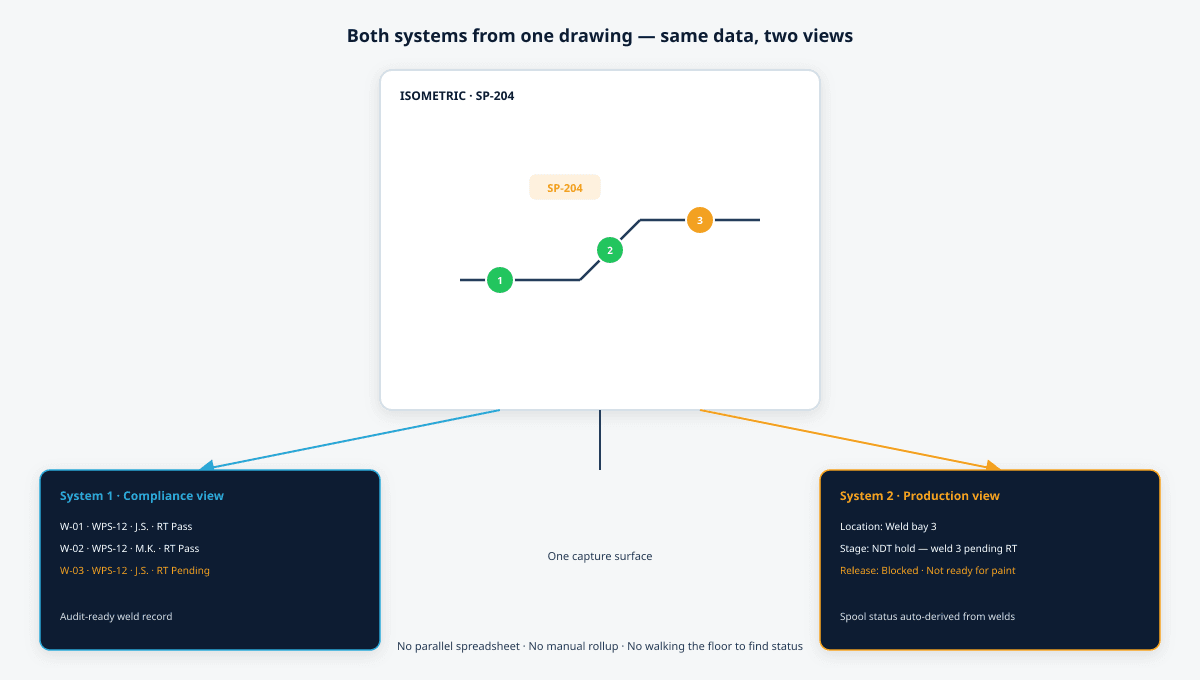
MapWeld treats the PDF isometric as the primary working document for both weld tracking and spool tracking. You load the drawing, place markers at weld positions, and the two systems build from the same data.
Weld tracking (System 1). Each marker carries welder ID, WPS, visual inspection status, NDT requirements, and repair history. This is the compliance record — queryable, exportable, and ready for turnover without reconstruction.
Spool tracking (System 2). Spool status is derived automatically from the weld markers on that spool. Fit-up, welding progress, inspection clearance, NDT holds, and release readiness are visible at the spool level — without a separate production log. When weld 4 is pending RT, the spool shows as blocked. When every weld clears, the spool shows as ready.
Production visibility on the drawing. Status markers on the isometric show which joints are complete, which are on hold, and which are still open. A fabrication manager looking at the drawing sees spool progress at a glance — not just weld-by-weld compliance data in a table.
Export on demand. When a spool is ready for handover, MapWeld exports a structured spool record — all welds, all statuses, full NDT history — directly from the drawing data. The compliance package and the production record come from the same source.
See our guide on NDT tracking for pipe fabrication for how hold points and repair loops work in the weld tracking layer.
Who This Matters For
Fabrication managers who need spool completion status and production readiness at any point — without rebuilding the register or walking the floor to find one missing spool.
QC inspectors who maintain the weld record on the drawing and don't want a parallel spreadsheet that drifts from the production reality.
Shop foremen who need to know which spools are cleared for the next operation and which are blocked — before assigning a crew.
Project managers who get asked by the client for progress on an active job and need a number they can trust in under 30 seconds — for both compliance status and production position.
If you're evaluating pipe spool tracking software, the question isn't whether it can store weld data. Most tools can. The question is whether it treats spool tracking as a production system — not just a column in a weld register — and whether spool status is derived automatically from the weld data underneath it.
Frequently Asked Questions
What is the difference between weld tracking and spool tracking?
Weld tracking is the QA and compliance record — organized by joint, mandated by code, covering welder, WPS, inspection, and NDT. Spool tracking is the production and physical traceability layer — organized by assembly, covering where the spool is in the workshop and what stage of fabrication it has reached. Both are needed; they answer different questions.
Why is spool tracking often missed?
Weld tracking has external pressure — codes, audits, client requirements. Spool tracking only has internal production pressure, and its failure cost (downtime, missing spool, idle crew) doesn't appear on audit reports. Shops invest in compliance systems by default. Production traceability gets improvised.
What happens when spool tracking is missing?
Production sequences stall. A crew waits because one spool can't be located or hasn't cleared a hold point. The weld register may be complete — but it doesn't tell you where the spool is or whether it's ready for the next operation. One missing spool can cost hours.
Can I track spools in Excel?
On small scopes, a weld register template with a spool column can cover both layers — if someone maintains the rollup manually. On larger projects, the gap between weld-level rows and spool-level production status becomes the bottleneck. The register drifts from the floor, and spool location information never gets captured at all.
What should pipe spool tracking software do?
At minimum: capture weld data on the drawing (System 1), aggregate spool production status automatically (System 2), show hold points visually, and export structured records for turnover. MapWeld does both layers in the browser with no installation — and works offline on the shop floor.
Getting Started
MapWeld works in the browser, runs offline, and doesn't require an account or installation.
If you have a PDF isometric package for a current or upcoming project, you can have weld tracking and spool tracking set up on your first spool in under 15 minutes.
Try it on one drawing — free, no account needed →
Running both systems on your project — or trying to close the gap between them? Email hello@mapweld.app — we're happy to walk through your workflow.