
Piping Tender Takeoffs: From a Site Sketch to an Accurate BOM with MapWeld
Most piping takeoffs don't start with a clean isometric. They start with a notepad.
You're on a site visit, or in a meeting with the client's engineer, and someone sketches the pipe run on a piece of paper — a rough freehand isometric, a few dimensions, a note about the flange rating. That sketch is often the only thing you have to price the job from. The weld count, the fitting list, the valve nobody wants to forget — all of that gets worked out afterward, from memory, back at the desk.
That's where quotes go wrong. Not because the estimator is careless — a hand tally off a rough sketch just has nothing to catch a mistake. Miss one elbow and the BOM is short a fitting. Miss a valve and you've under-quoted the one line item worth getting right. Change the routing halfway through the site conversation, which happens constantly, and every count you'd already done in your head has to be redone.
The sketch isn't the problem
A hand-drawn isometric is often faster and more honest than a formal drawing — it's what the client actually wants built, before anyone's spent time on CAD. What breaks things is everything that happens to that sketch afterward: the mental tally, the memory of what was on it, the transcription into a BOM before the quote goes out.
MapWeld treats the sketch itself as the working drawing. Photograph it or scan it, load it in the same way you'd load a PDF isometric, and mark it up on the spot — weld positions, flanges, fittings, valves, straight off the sketch. Nothing needs to be redrawn or cleaned up first.
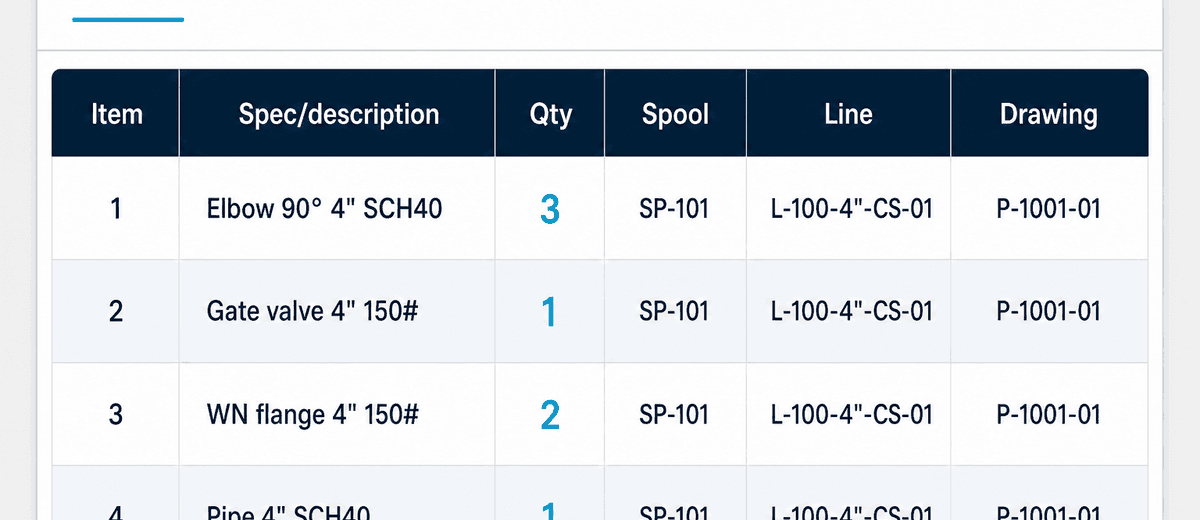
From there it works the way it would on a formal tender package. Each part you place rolls into a BOM line by spec, with a quantity — two more of the same elbow on the drawing just bumps the qty instead of adding a duplicate row. Each weld marker carries size, type, and joint side, so weld count and diameter-inch totals come out of the markup instead of a separate hand count — useful when you're building an NDT allowance into the quote.
The BOM you get is built from what's actually marked on the drawing — not from what someone remembers was on it an hour later.
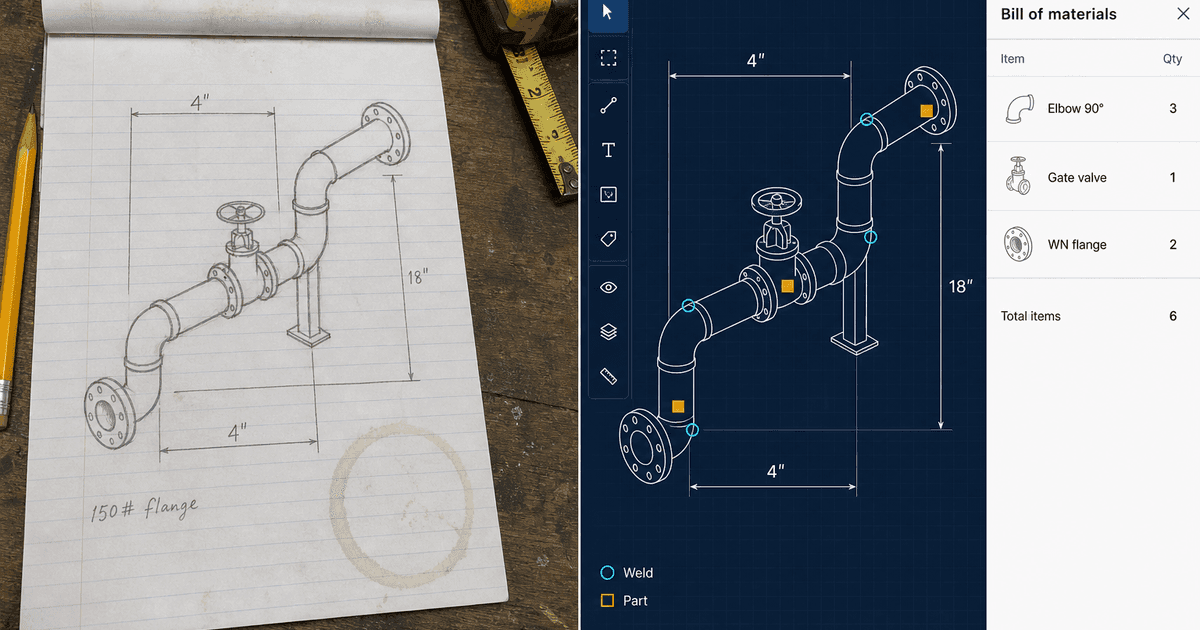
Nothing forgotten, nothing stuck
The two things that go wrong most often on a fast quote are missed parts and quantities that don't survive a change.
Working off explicit markers instead of a mental tally closes the first one. A valve you placed on the drawing shows up in the BOM whether or not you'd have remembered it by the time you're pricing the job.
The second is just as common: the client changes the routing, or a spool needs one more support, and now a number buried in a spreadsheet has to be found and corrected without breaking whatever else referenced it. On the drawing, that's editing one marker. Bump the quantity, add a joint, drop a fitting — the BOM and the weld count update from that single change. There's only one record to keep straight, so nothing drifts.
Same file if the job is awarded
If the routing turns into an actual project, the file doesn't get rebuilt. The markers placed at tender stage — welds, parts, spool assignments — are the same ones the QC team works from in fabrication. Add the WPS library, personnel, and NDT policies, and the quantity capture done on a napkin sketch becomes the QC baseline.
The same workflow applies to a formal PDF isometric package issued for a competitive bid — load the drawings, mark welds and parts, roll up quantities, export. The sketch case is just the sharpest example, because it's the one where a manual tally is most likely to miss something.
Related: pipe spool tracking · NDT tracking for pipe fabrication · isometric drawing markup